MagnaCards
What it is
A MagnaCard is a 6×9-inch postcard with an integrated detachable magnet section. It mails like a standard postcard but - when it arrives - the recipient can remove the magnet along a perforated cut line and place it on any magnetic surface (refrigerator, filing cabinet, locker, etc.). Instead of being recycled after a glance, your message stays visible for months.
How it works
- Production - The postcard prints as a standard 6×9 card with a magnet layer integrated into a designated cut-out section.
- Delivery - Mailed via USPS just like any other postcard. The magnet section is marked and ready to be removed.
- Recipient interaction - The recipient flips the card over, sees the marked section, and peels the magnet away along the cut line. It then sticks to any metal surface.
When to use it
- Real estate agents farming a neighborhood: your contact info stays visible for the entire listing season
- Local service businesses (plumbers, HVAC, pest control): stay top-of-mind between service calls
- Restaurants and food delivery: a menu or QR code on the fridge is a powerful reorder prompt
- Any campaign where you want the recipient to keep your mail rather than discard it
Design tips
- Include clear instructions on the back. Add a short line like "Detach this magnet and stick it on your fridge or workspace!" so recipients know the card has a removable piece.
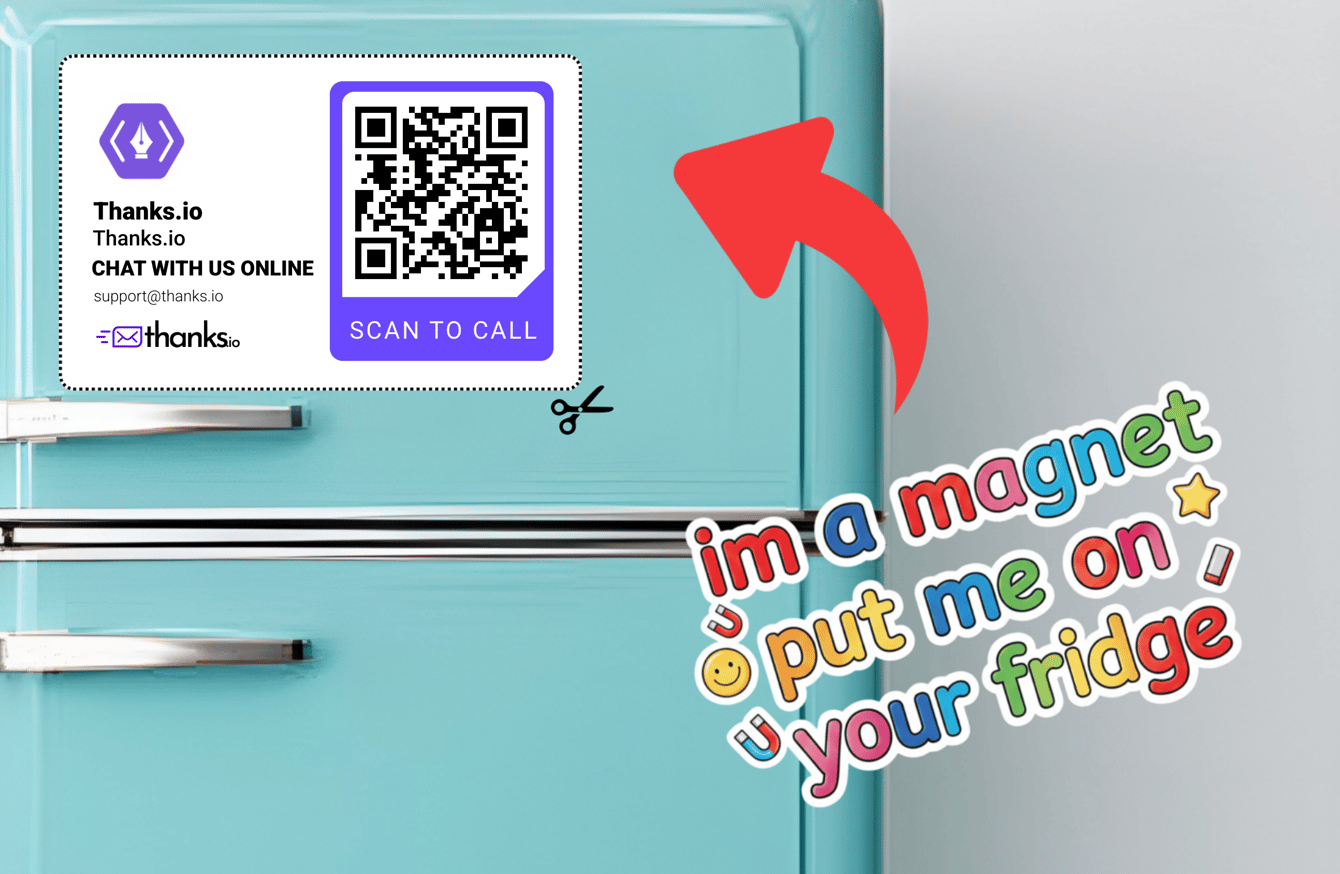
- Put your most important content on the magnet area. Contact details, a QR code, or a key call to action work well because the recipient will see them every day after detaching the magnet.
- Include your phone number, website, and key service description in the front design - this is a reference card that will be viewed repeatedly.
- Use high-contrast colors and clean typography. The piece will be viewed at refrigerator distance, often quickly.
- Avoid design that looks purely promotional. A MagnaCard that looks like a useful reference (e.g., a contractor's emergency contact card) stays up longer than one that looks like an ad.
Design examples
Example of a Magna Card front (the side that includes the magnet section):
Designing your Magna Card in Canva
We provide a Canva template with clearly marked safe zones and cut lines for both the front and the back of the card.
Steps
- Open the Canva template using the link above.
- Design within the safe zones - keep all important content inside the indicated boundaries.
- Use the cut line guides to position the magnet section correctly on the front.
- Customize with your branding, messaging, QR codes, and imagery.
Remove the guides before downloading
The safe zone and cut line guides are for reference only. They must not appear in the final file.
Before downloading:
- Delete or hide all guide layers (safe zones, cut lines, and instructional text).
- Confirm that only your finished artwork is visible.
- Download using the export settings shown in the template.
If guide elements are locked in the template, unlock them before deleting or hiding them.
Leaving guide lines in your final file may cause them to print on the card. Removing them ensures a clean result.
Uploading your Magna Card to thanks.io
Save your Magna Card as a creative so you can send it again or use it in a campaign.
- Log in to your thanks.io account.
- Go to Creatives in the sidebar and click New creative.
- Choose Build it yourself, then choose the Magnacard as the mail piece.
- On the front step, click Upload a file and select the file you downloaded from Canva. Upload it at 2588 × 1688 px for the best print quality.
- Write the message for the back, then give the creative a name and click Save creative.
The preview draws the cut line, safety zone and magnet area over your design. Review it to confirm:
- All important content is inside the safety zone.
- The magnet section is positioned correctly.
- No guide lines or instructional text are visible.
If adjustments are needed, return to Canva, make edits, and upload the updated file again. You can also upload a front for a single send on the Separate front & message tab of Send Mail. ThanksAI is not available for MagnaCards. See Creating a Creative.
Video walkthrough
The videos on this page were recorded on an earlier layout of the dashboard, so some screens and names may differ from what you see today.
Tips & best practices
- For real estate farming, combine MagnaCards with the Neighbor Blast campaign to send to addresses within a radius of a Just Listed / Just Sold property.
- Use evenFLOW to pace large MagnaCard campaigns to a daily limit.
- Pair MagnaCards with a follow-up postcard campaign. The MagnaCard establishes your presence; the postcard prompts action.
- Use the magnet to reinforce follow-up - pair it with a special offer or reorder incentive to drive repeat action.
Frequently asked questions
Can the magnet damage mail processing? No. The magnet is designed to be compatible with USPS sorting and delivery processes.
What surfaces will the magnet stick to? Any metal surface with magnetic attraction - refrigerators, lockers, filing cabinets, and similar surfaces.